

If you’re studying Linux SysAdmin interview questions, you need more than textbook answers. This 2026 guide focuses on practical troubleshooting and the reasoning hiring managers expect. Hiring managers at enterprise shops — finance, healthcare, government contractors, cloud shops — want to know you’ve actually broken things and fixed them under pressure.
This article covers the real questions you’ll face in 2026 across every major domain: architecture, networking, permissions, systemd, logs, Bash, storage, security, and scenario-based troubleshooting. Study these. Practice the answers out loud. Know the “why” behind every command.
If you use AI in your Linux workflow, the Linux SysAdmin AI Prompt Pack gives you 50 ready-to-use prompts for troubleshooting, Bash scripting, Ansible, incident response, documentation, and automation.
General Linux Architecture Questions
Q: What happens from the moment you press the power button to the login prompt?
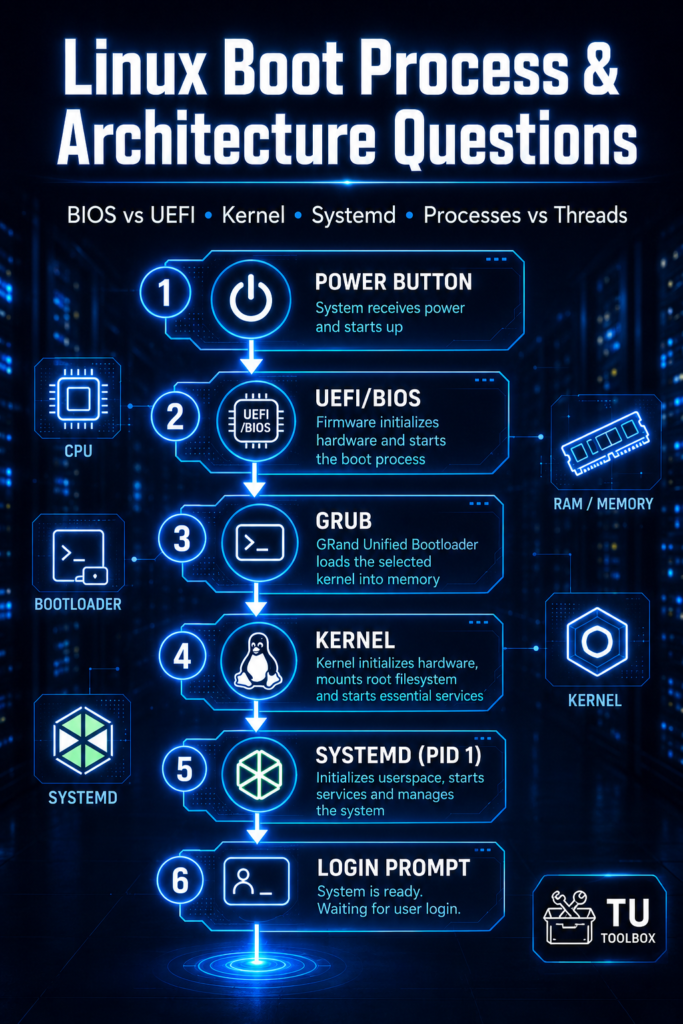
Walk through: BIOS/UEFI → POST → bootloader (GRUB2) → kernel loads into memory → initramfs unpacked → kernel mounts root filesystem → systemd (PID 1) starts → targets run in order → getty spawns login prompt.
If you can’t explain this end-to-end, you will lose points in a senior interview.
Q: What is the difference between a process and a thread?
A process has its own memory space. Threads share memory within the same process. Relevant when you’re explaining why a crashed Apache worker doesn’t kill the parent or debugging a Java app eating CPU.
Q: What does the kernel do that userspace cannot?
Direct hardware access, memory management, scheduling, syscalls. Everything else runs in userspace and makes requests to the kernel through system calls. Know the boundary.
Q: Explain the Linux boot process differences between BIOS and UEFI.
BIOS uses MBR (512 bytes, max 4 primary partitions, 2TB disk limit). UEFI uses GPT (128 partitions, no 2TB limit, supports Secure Boot). In 2026, UEFI is standard but you’ll still find BIOS in legacy enterprise hardware.
Networking Questions
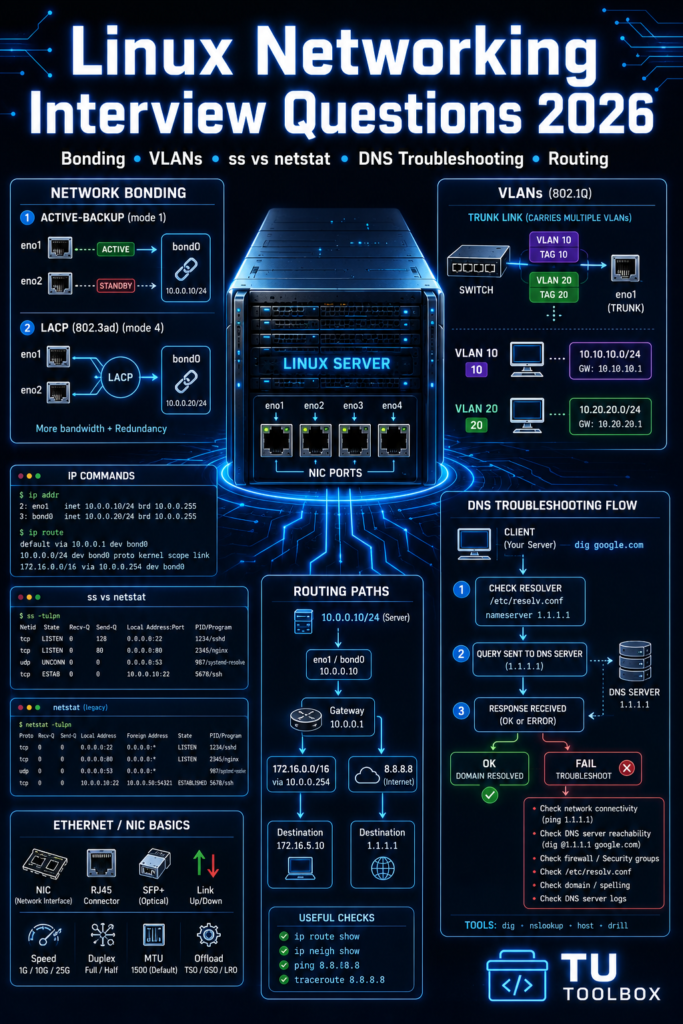
Q: A server has two NICs. How do you configure bonding for high availability?
Use nmcli or edit /etc/sysconfig/network-scripts/ (RHEL 7/8) or /etc/NetworkManager/ on RHEL 9. Mode 1 (active-backup) for failover. Mode 4 (802.3ad LACP) for load balancing with switch support. Know the difference between them — mode 1 is simpler and safer for most enterprise configs.
Q: What is the difference between ss and netstat?
netstat is deprecated. ss from the iproute2 package is faster and pulls directly from kernel socket tables. Use ss -tulnp to show listening TCP/UDP ports with process names.
Q: How do you troubleshoot a server that can ping by IP but not by hostname?
DNS issue. Check /etc/resolv.conf for nameserver entries. Check /etc/nsswitch.conf for resolution order (files, dns). Test with dig and nslookup to isolate whether it’s the resolver or DNS server. Check if the DNS server is reachable. Check /etc/hosts for conflicts.
Q: What is a VLAN and how does Linux handle it?
VLANs segment network traffic at Layer 2. Linux handles them through the 8021q kernel module. You create a VLAN interface like eth0.100 with ip link add link eth0 name eth0.100 type vlan id 100.
Q: A server cannot reach the internet but can reach the local network. What do you check?
Default route first: ip route show. If no default route, add one. If route exists, check gateway reachability with ping. If gateway responds, check firewall rules with iptables -L -n -v or firewall-cmd --list-all. Then check DNS.
Permissions and Ownership
Q: What does chmod 4755 do?
Sets the SUID bit. The executable runs with the file owner’s permissions, not the invoking user’s. 755 means owner rwx, group r-x, others r-x. Classic example: /usr/bin/passwd runs as root regardless of who calls it. Know the security implications — SUID on shell scripts is dangerous.
Q: What is the sticky bit and where is it used?
chmod 1777. Users can only delete their own files in a shared directory even if they have write access to the directory. /tmp is the textbook example.
Q: What is umask and what does umask 022 produce?
umask subtracts permissions from the default. Default for files is 666, for directories 777. umask 022 gives 644 for files, 755 for directories. If a developer complains that files their app creates can’t be read by the web server user, check their umask.
Q: What is ACL and when do you use it over standard permissions?
setfacl/getfacl. Use when you need to give a specific user or group access without changing the primary ownership or group. Example: give the monitoring user read access to application logs without adding them to the app group.
systemd and Service Management
Q: How do you create a simple systemd service unit?
[Unit]
Description=My App
After=network.target

[Service]
Type=simple
ExecStart=/usr/local/bin/myapp
Restart=on-failure
User=myapp

[Install]
WantedBy=multi-user.target
Place in /etc/systemd/system/. Run systemctl daemon-reload then systemctl enable --now myapp.
Q: What is the difference between systemctl stop and systemctl disable?
stop kills the running process now. disable removes the symlink so it does not start on next boot. You usually want both when decommissioning a service.
Q: A service is in failed state. How do you debug it?
systemctl status servicename
journalctl -u servicename -n 50 --no-pager
journalctl -u servicename --since "10 minutes ago"
Read the actual error. 99% of people just restart the service without reading the log. That is how problems recur.
Q: What is a systemd target and how does it compare to runlevels?
Targets replaced SysVinit runlevels. multi-user.target ≈ runlevel 3 (multi-user, no GUI). graphical.target ≈ runlevel 5. rescue.target ≈ runlevel 1. Use systemctl get-default to see the current default target.
Logs and Troubleshooting
Q: Where are logs stored and how do you read them efficiently?
journalctl for systemd journal. /var/log/messages or /var/log/syslog for persistent logs on most distros. /var/log/secure or /var/log/auth.log for authentication. Use -f to follow, -u to filter by unit, --since and --until for time ranges.
Q: How do you find what process is writing to a specific log file?
lsof /var/log/filename shows open file handles. inotifywait -m /var/log/filename watches for writes in real time.
Q: A server’s disk fills up suddenly. Walk through your investigation.
df -h                          # Which filesystem is full
du -sh /var/log/* | sort -rh   # Biggest directories
lsof | grep deleted            # Deleted files still held open by processes
find / -size +1G               # Large files
Most common causes: runaway log file, core dump, tmpwatch not running, application writing to wrong path.
Q: How do you read kernel ring buffer messages?
dmesg or dmesg -T for human-readable timestamps. journalctl -k for kernel messages through journald. Critical when debugging hardware issues, OOM killer events, or NFS problems.
Bash Scripting Questions
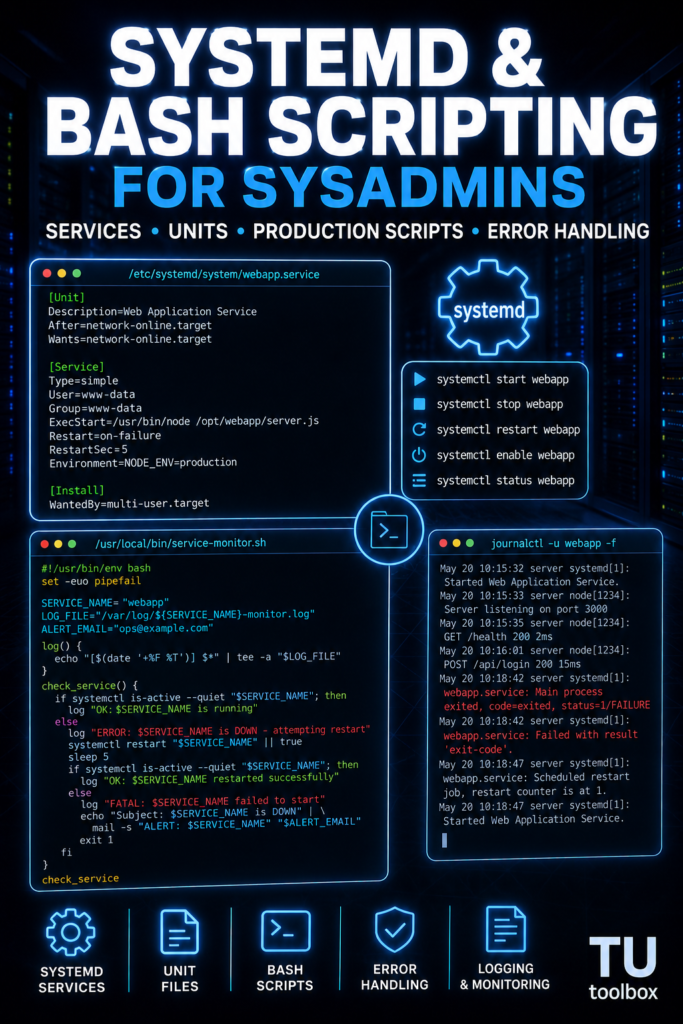
Q: Write a script that checks if a service is running and restarts it if not.
#!/bin/bash
SERVICE="nginx"
if ! systemctl is-active --quiet "$SERVICE"; then
    echo "$SERVICE is down. Restarting..."
    systemctl restart "$SERVICE"
    echo "Restarted at $(date)" >> /var/log/service-monitor.log
fi
Q: What is the difference between $() and backticks?
Both capture command output but $() is nestable and easier to read. Always use $() in modern scripts. Backticks are legacy.
Q: What does set -euo pipefail do and why should you use it?
set -eexits the script on any errorset -utreats unset variables as errorsset -o pipefailmakes pipes fail if any command in the pipe fails
Use it at the top of every production script. Without it, a failed command mid-script continues silently and causes hard-to-debug downstream failures.
Q: How do you handle script arguments safely?
if [ $# -lt 2 ]; then
    echo "Usage: $0 <arg1> <arg2>"
    exit 1
fi
ARG1="${1}"
ARG2="${2}"
Quote all variables. Validate inputs. Never trust user-supplied arguments in scripts with elevated privileges.
For a deep library of production-ready Bash scripts you can use immediately, check the Bash Script Library for Linux — it covers monitoring, automation, and common sysadmin tasks.
Storage and Disk Management
Q: What is the difference between fdisk and parted?
fdisk is for MBR/GPT disks under 2TB interactively. parted handles GPT and large disks, supports scripting. For anything in production over 2TB, use parted or gdisk.
Q: How do you extend a LVM logical volume online?
lvextend -L +10G /dev/mapper/vg_data-lv_data
xfs_growfs /mountpoint          # for XFS
resize2fs /dev/mapper/vg_data-lv_data  # for ext4
XFS can only grow, not shrink. Test this in a lab before you need it in production at 2am.
Q: How do you check disk I/O performance?
iostat -x 1 5 from the sysstat package. Look at %util (utilization) and await (average wait time in ms). iotop shows which processes are hitting disk hardest. If %util is near 100% consistently, the disk is saturated.
Q: What does fstab entry noatime do and why use it?
Prevents updating the access time on every file read. Significant performance improvement on busy read-heavy systems. Pair with nodiratime. Common on database servers, busy web servers, and systems with spinning disks under load.
Security Questions
Q: How do you audit who logged into a server and what they ran?
last for login history from /var/log/wtmp. lastb for failed logins from /var/log/btmp. ausearch and aureport from auditd for detailed command auditing. If auditd is not running, you have a compliance gap.
Q: What is SELinux and what are its three modes?
Security-Enhanced Linux enforces mandatory access controls beyond DAC. Three modes:
- Enforcing — policies enforced, violations blocked and logged
- Permissive — violations logged but not blocked (use for testing)
- Disabled — SELinux off entirely (never do this in production)
getenforce to check. setenforce 0 temporarily sets permissive. Never set Disabled in /etc/selinux/config without understanding why.
Q: A developer wants you to open port 8443. How do you do it properly on RHEL?
firewall-cmd --permanent --add-port=8443/tcp
firewall-cmd --reload
firewall-cmd --list-ports   # verify
If SELinux is enforcing, also check if the port needs an SELinux label: semanage port -l | grep 8443. If it’s not listed for the relevant context, add it.
Q: How do you harden SSH?
Disable root login (PermitRootLogin no), disable password auth (PasswordAuthentication no), restrict to specific users (AllowUsers username), change the default port, use fail2ban, restrict ciphers to modern ones, enable ClientAliveInterval to kill dead sessions.
Scenario-Based Enterprise Troubleshooting
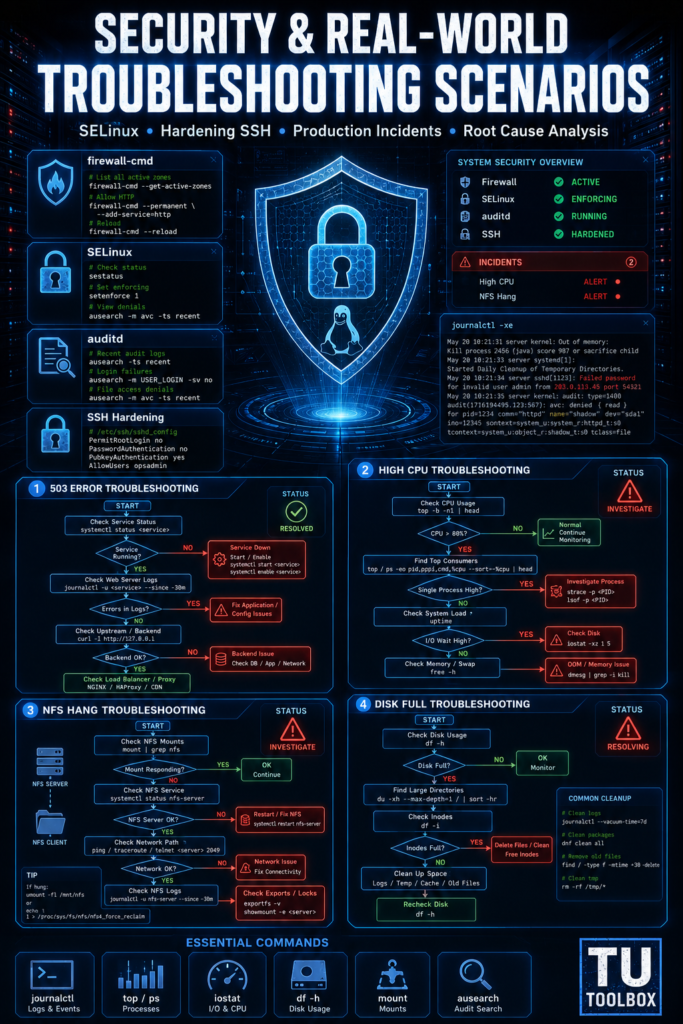
Scenario 1: A production web server is unreachable. Customers are reporting 503 errors. What do you do in the first 5 minutes?
Check if the server responds to ping. If yes, check if the web service is running (systemctl status nginx). Check service logs for errors. Check disk space (df -h). Check if the upstream load balancer or firewall changed. Check application logs. Most 503 errors are either a dead app process, full disk, or a failed upstream service.
Scenario 2: A server is running extremely slow. CPU is at 100%. How do you find the cause?
top                    # See which PID is at the top
ps aux --sort=-%cpu    # Sorted process list
strace -p <PID>        # What syscalls is it making
perf top               # Kernel-level CPU profiling
If it’s a runaway cron job, pkill it and fix the script. If it’s a legitimate workload spike, find out why — check deployment logs, application logs, and whether a new cron was added.
Scenario 3: You get a call at 11pm. NFS mounts are hanging across 20 servers. What do you do?
Check the NFS server first: systemctl status nfs-server. Check network path to NFS server from an affected client. Run showmount -e nfs-server — if it hangs, the NFS server is unreachable or the service is down. On the client: mount | grep nfs to confirm the mount exists. Use umount -l (lazy unmount) on affected clients while you fix the server to prevent df and other commands from hanging.
Scenario 4: Disk I/O on a database server spikes every night at 2am. How do you investigate?
Check cron jobs: crontab -l, /etc/cron.d/, /etc/cron.daily/. The spike is almost certainly a backup job, log rotation, or database maintenance task. Use atop if installed — it records historical resource usage by time. sar -d from sysstat also captures historical disk activity if enabled.
Get the Full Interview Prep Kit
These questions will get you through most first and second rounds. But senior and staff-level interviews go deeper — they test you on actual RHEL environments, Ansible, FreeIPA, VMware, Docker, and real production scenario walkthroughs.
The Linux SysAdmin Interview Prep Kit covers 200+ real interview questions across all major domains, sample answers written at the senior level, and a pre-interview checklist you can review the night before. If you have an interview coming up in the next two weeks, this is the fastest way to close gaps.
More Linux Resources on ToolsUnpacked
If you’re building skills alongside your interview prep, these are worth reading:
- Best AI Tools for Linux SysAdmins in 2026 — AI tools that make real sysadmins work faster
- Best Bash Scripts for Linux SysAdmins in 2026 — production-ready scripts you can use immediately
- How AI Tools Are Solving Linux Server Monitoring Problems in 2026 — modern monitoring approaches for enterprise environments
FAQ
What level of Linux interview is this guide for? Mid-level to senior. Junior roles will test a subset of these. Staff and principal roles will go deeper into architecture and custom scenario work.
Do I need to memorize every command? Know the concepts and the commands you’d actually use. Interviewers care more that you can reason through a problem than recall exact flags. That said, know ss, journalctl, systemctl, lsof, df, du, top, and iotop cold.
Should I lab these scenarios before my interview? Yes. Set up a cheap RHEL or CentOS Stream VM on a spare machine or a $6/month VPS. Break things intentionally and fix them. That experience comes through clearly in interviews.
What certifications help for Linux sysadmin roles in 2026? RHCSA is the baseline for RHEL shops. RHCE for senior roles. LFCS (Linux Foundation Certified SysAdmin) is respected at cloud-forward companies. CKA (Kubernetes) is increasingly expected if the role involves containerized workloads.
How long should I spend preparing for a senior Linux interview? Two to four weeks of daily 30–60 minute review sessions, with hands-on lab time. More if you’re moving from a junior or mid-level role. The Interview Prep Kit cuts that time down significantly because it’s structured around what interviewers actually ask.
Updated May 2026. ToolsUnpacked.com — Tools, scripts, and resources for working sysadmins.
Stop watching. Start solving.
Practice Linux, AWS, PostgreSQL, and cross-layer production incidents with evidence packs, progressive hints, scoring, and validation.
One Comment