

Best AI Tools for Linux SysAdmins in 2026 (Free & Paid)
Linux system administration is changing rapidly. Managing infrastructure manually is no longer efficient. In 2026, terminal-based AI assistants, automated log parsers, and intelligent troubleshooting agents are standard requirements for high-performing DevOps teams.
Using the best AI tools for Linux sysadmins allows you to automate repetitive scripts, detect anomalies before downtime occurs, and resolve complex configuration issues in seconds.
Want the exact AI prompts for Linux troubleshooting, Bash scripting, logs, Ansible, and incident response?
I built the Linux SysAdmin 50 AI Prompt Pack for SysAdmins and Linux Engineers who want practical prompts they can copy, paste, and adapt during real infrastructure work.
Below are the top AI tools for Linux administrators ranked by efficiency, security, and integration capabilities.
1. Warp Terminal (AI Command Generation)
Warp is a modern, Rust-based terminal with built-in AI capabilities that replaces legacy terminal emulators.
- Key Feature: Warp AI allows you to type natural language prompts directly into the command line to generate accurate Bash, Zsh, or Fish commands.
- Best For: Rapid command generation and explaining complex nested pipelines without leaving the terminal.
- Pros: Blazing fast execution; saves local command history blocks; secure team sharing features.
- Cons: Requires an account login; cloud features may conflict with strict corporate security policies.
2. KubeGPT (Kubernetes & Linux Orchestration AI)
KubeGPT specializes in debugging Kubernetes clusters running on Linux distributions.
- Key Feature: It ingests real-time cluster states to pinpoint failed pods, misconfigured YAML files, and ingress bottlenecks.
- Best For: Sysadmins transitioning into DevOps and managing complex cloud-native architectures.
- Pros: Translates cryptic Kubernetes error codes into step-by-step resolution playbooks.
- Cons: Steep learning curve for teams not running containerized workloads.
3. ShellAI (Open-Source CLI Companion)
ShellAI is a lightweight, open-source utility that brings LLM capabilities directly into your local bash environment via API keys.
- Key Feature: It accepts natural language queries and outputs functional bash one-liners directly to your prompt.
- Best For: Budget-conscious sysadmins who want localized AI assistance without proprietary software overhead.
- Pros: Highly customizable; works with local models (Ollama) or open APIs; complete privacy control.
- Cons: Requires manual configuration and API management.
[convertkit form=9463001]
How AI Complements Linux Server Monitoring
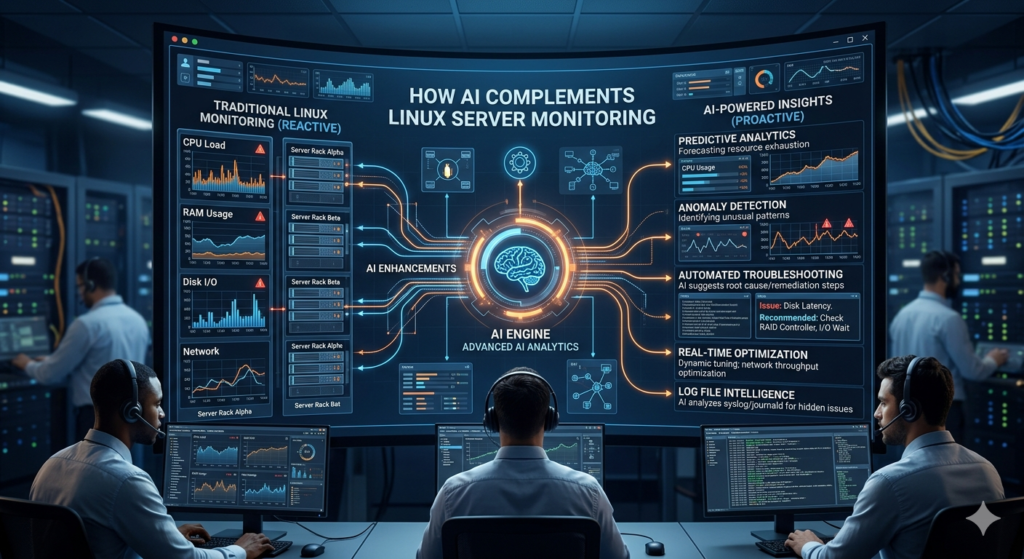
Deploying localized AI utilities speeds up daily maintenance, but modern infrastructure also requires continuous observation. Combining interactive command-line AI assistants with automated telemetry systems provides complete operational coverage.
If your main focus is server monitoring, alerts, and log analysis, I also wrote a deeper guide on how AI tools are solving Linux server monitoring problems in 2026. That article breaks down how AI can help Linux sysadmins detect downtime risks faster, reduce alert fatigue, and troubleshoot server issues before they become bigger problems.
Production Safety Warning: Verify Before Executing
Never pipe raw AI-generated output directly into a production root shell (e.g., avoiding ai-command | bash).
- The Risk: AI models can hallucinate incorrect flags, destructive path arguments (
rm -rf), or deprecated syntax. - The Rule: Always inspect code blocks in a staging environment or a restricted user account before executing them with root or
sudoprivileges.
Want to Become a Better Linux SysAdmin Faster?
Automating workflows with AI requires a strong foundation in core administration principles and script architecture. If you are preparing for Linux interviews, troubleshooting tickets, or real sysadmin work, these two resources can help you move faster:
- Linux SysAdmin Interview Prep Kit: Master core architectural questions, networking problems, and real-world troubleshooting scenarios used by top enterprise hiring teams.
- Bash Script Library for Linux: A production-ready collection of secure, thoroughly commented bash scripts for automated backups, user provisioning, log rotation, and security auditing.
If you want practical scripts you can actually use, read my guide to the best Bash scripts for Linux sysadmins in 2026
Frequently Asked Questions
Can AI completely automate Linux system administration?
No. AI acts as a force multiplier for syntax generation, log parsing, and initial troubleshooting. Human oversight remains mandatory for security auditing, architectural design, and critical production decisions.
Are these AI terminal tools safe for enterprise data privacy?
It depends on the tool deployment. Proprietary cloud tools process data on external servers. For strict compliance environments, utilize open-source frameworks like ShellAI paired with local models running entirely offline.
Prepping for finance or technical interviews?
ToolsUnpacked products are built to help you answer cleaner, avoid preventable mistakes, and show up prepared.
2 Comments