

Every business collects information from people. Applications. Orders. Feedback. Support requests. Event registrations. Contact forms.
The question isn’t whether you need forms — you do. The question is whether you need JotForm specifically, or whether a free alternative handles everything you need.
I’m Shelton, a Linux Systems Engineer who evaluates software the same way I evaluate infrastructure — does it actually perform under real conditions, or does it just look good in a demo?
Here’s my honest JotForm review after putting it through its paces across multiple use cases in 2026.
“Want my free guide — 15 AI Tools That Actually Save You Time in 2026? Grab it free here“
What Is JotForm?
JotForm is a cloud-based form builder that lets you create professional forms without writing a single line of code. You drag fields onto a canvas, configure your settings, and share a link or embed the form on your website.
Simple concept. But the execution is where JotForm separates itself from the dozens of competitors in this space.
Founded in 2006, JotForm now serves over 25 million users globally. That’s not a marketing number — it’s a signal that the product solves a real problem reliably enough that people keep paying for it.
Who Is JotForm For?
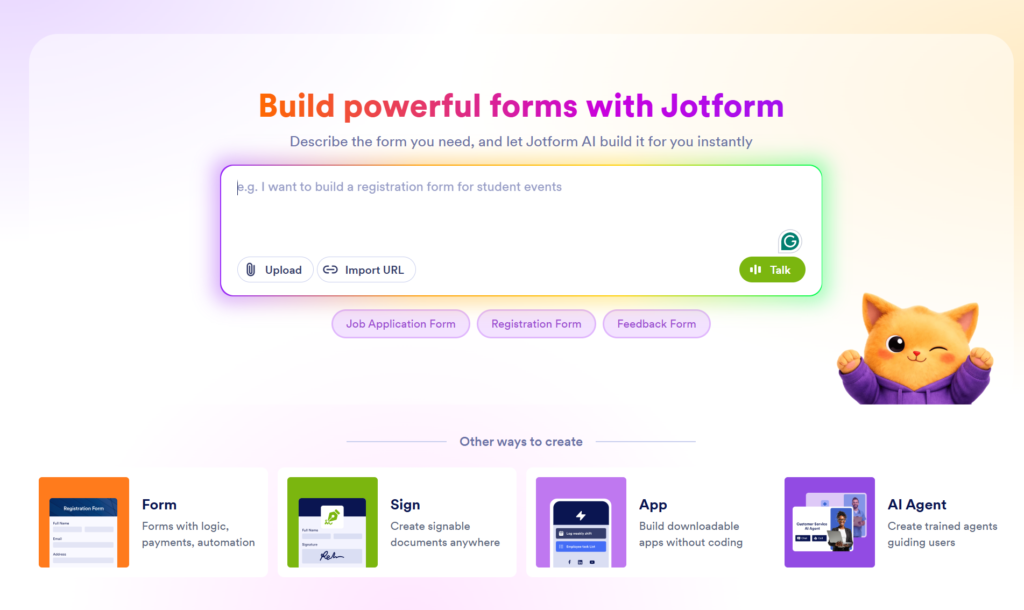
Drag-and-Drop Form Builder
The builder is genuinely intuitive. You don’t need training. Pick a template or start from scratch, drag your fields in, configure your settings, and you’re done. I built a complete client intake form in under 8 minutes on my first session.
10,000+ Templates
JotForm has templates for virtually every use case — job applications, event registrations, medical intake, order forms, contracts, surveys, and hundreds more. Most templates are production-ready with minimal customization.
Conditional Logic
This is where JotForm gets serious. Conditional logic lets your form show or hide fields based on previous answers. A customer selecting “Enterprise Plan” sees different questions than one selecting “Starter Plan.” This level of smart routing used to require a developer. JotForm makes it a 5-minute drag-and-drop setup.
250+ Integrations
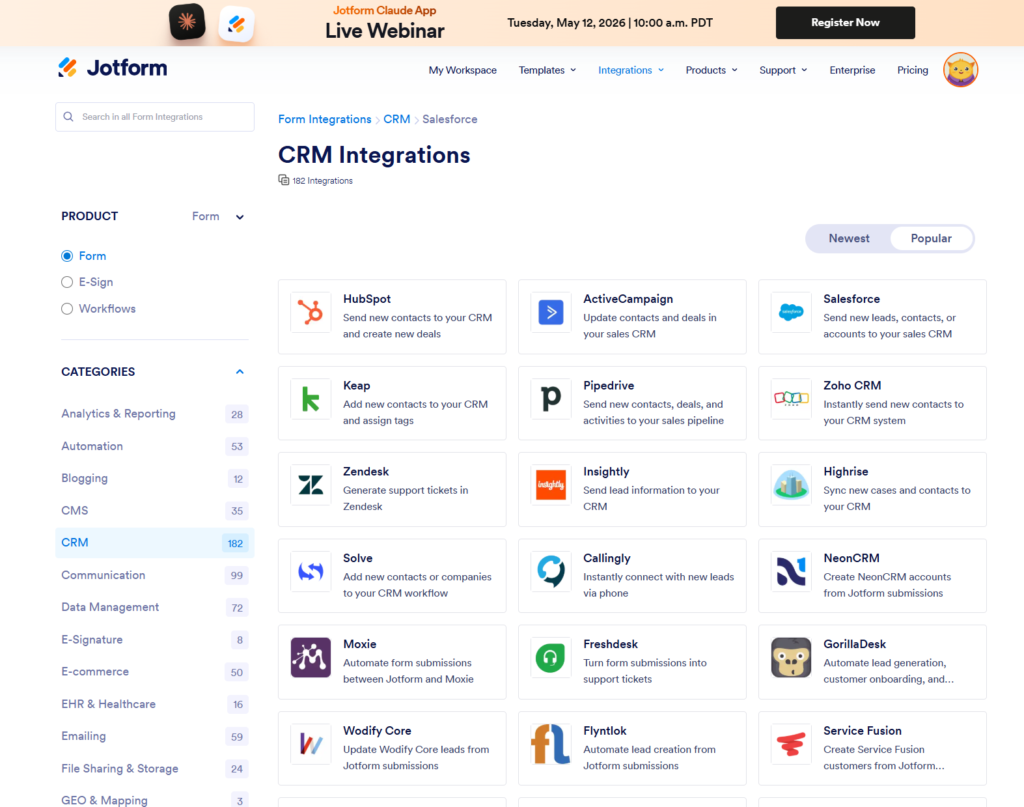
JotForm connects to the tools you already use — Google Sheets, Notion, HubSpot, Slack, Kit (ConvertKit), Mailchimp, PayPal, Stripe, Salesforce, and 240+ more. Every form submission can automatically trigger a workflow in your existing stack.
Payment Collection
Accept payments directly through JotForm forms — no separate checkout page needed. Supports PayPal, Stripe, Square, and 30+ payment processors. Perfect for service businesses collecting deposits or digital product sellers.
E-Signatures
Collect legally binding electronic signatures directly in your forms. No DocuSign subscription needed for basic contract signing. This alone saves solopreneurs $20–$25/month.
HIPAA Compliance
JotForm offers HIPAA-compliant forms on paid plans — critical for healthcare providers, therapists, and wellness businesses that collect protected health information.
Mobile-Responsive Forms
Every JotForm form automatically adapts to mobile screens. In 2026, when over 60% of web traffic comes from mobile devices, this isn’t optional — it’s table stakes. JotForm handles it automatically.
JotForm Pricing — Is It Worth It?
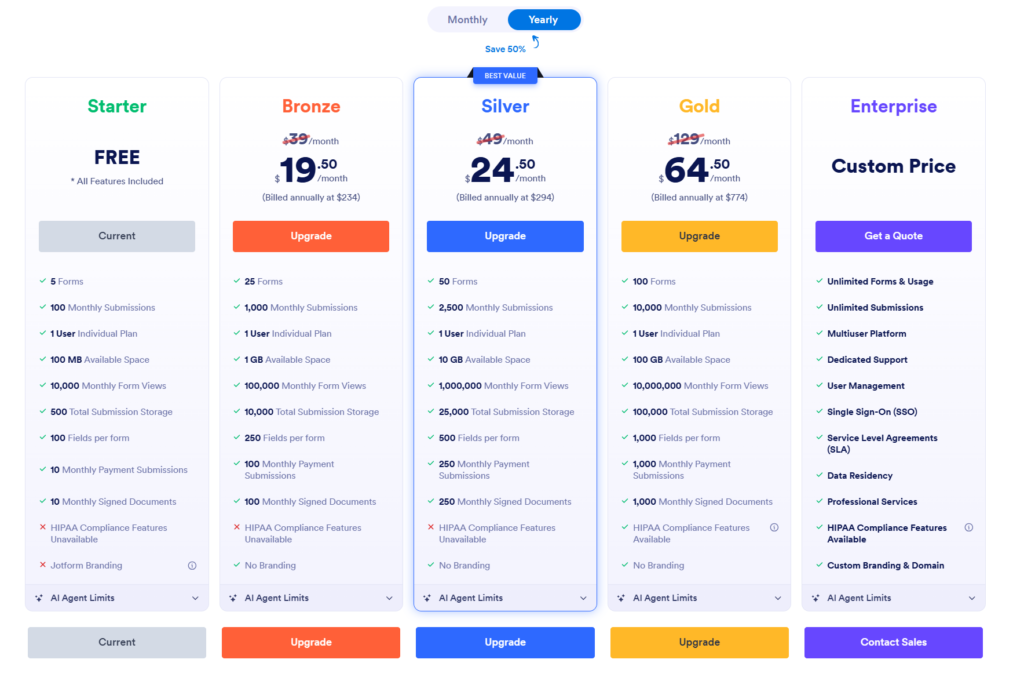
| Plan | Price | Forms | Submissions | Storage |
|---|---|---|---|---|
| Free | $0/month | 5 forms | 100/month | 100MB |
| Bronze | $34/month | 25 forms | 1,000/month | 1GB |
| Silver | $39/month | 50 forms | 2,500/month | 10GB |
| Gold | $99/month | Unlimited | 10,000/month | 100GB |
| Enterprise | Custom | Unlimited | Unlimited | Unlimited |
Is the free plan enough? For a solopreneur just getting started — yes. 5 forms and 100 submissions per month covers a contact form, a client intake form, a feedback form, and two more. Most solo operations don’t exceed 100 submissions monthly in the early stages.
When to upgrade: Upgrade to Bronze ($34/month) when you’re processing more than 100 form submissions per month or need more than 5 active forms simultaneously. At that point you’re likely generating enough business to justify the cost easily.
JotForm vs The Competition
| Feature | JotForm | Typeform | Google Forms |
|---|---|---|---|
| Free plan | ✅ 5 forms | ✅ Limited | ✅ Unlimited |
| Conditional logic | ✅ All plans | ✅ Paid only | ✅ Basic |
| Payment collection | ✅ 30+ processors | ✅ Limited | ❌ No |
| E-signatures | ✅ Yes | ❌ No | ❌ No |
| HIPAA compliance | ✅ Paid plans | ❌ No | ❌ No |
| Templates | ✅ 10,000+ | ✅ 800+ | ✅ Basic |
| Integrations | ✅ 250+ | ✅ 500+ | ✅ Google only |
| Starting paid price | $34/month | $25/month | Free |
Vs Google Forms: Google Forms is free and handles basic data collection well. But no payment collection, no e-signatures, no conditional logic on complex flows, and limited design options. JotForm wins for any business use case beyond simple surveys.
Vs Typeform: Typeform is more visually polished and conversational. JotForm wins on functionality — especially payment collection, HIPAA compliance, and the sheer breadth of templates. If aesthetics are your priority, Typeform. If functionality and reliability are your priority, JotForm.
What I Like About JotForm
The template library is genuinely useful. Most template libraries are filled with generic placeholder designs. JotForm’s 10,000+ templates are specific and production-ready — I found a Linux IT help desk intake template that needed less than 10 minutes of customization before it was deployable.
The integrations work reliably. I connected JotForm to Notion and Google Sheets on the same form. Every test submission appeared in both places within seconds. No broken webhooks, no missing fields. It just worked.
Conditional logic is powerful and accessible. You don’t need to understand logic programming to build smart forms. The interface is visual and intuitive. This is the feature that separates JotForm from basic form builders.
The free plan is genuinely useful. Many “free” plans are crippled to force upgrades. JotForm’s free tier gives you 5 real forms with real functionality. You can run a legitimate small business operation on the free plan for months before needing to upgrade.
What I Don’t Like About JotForm
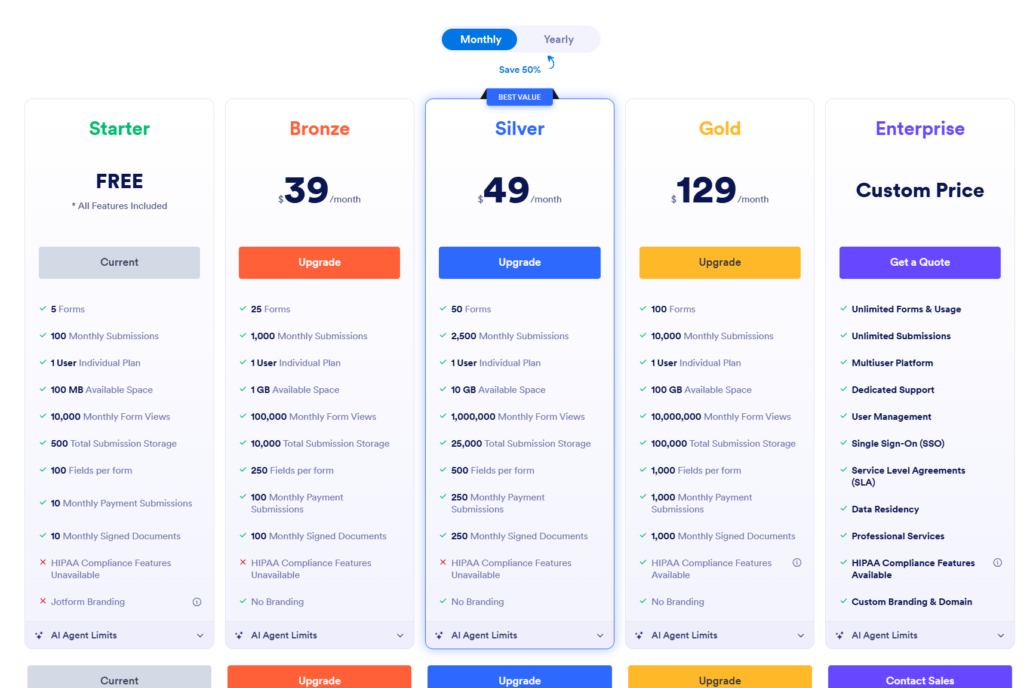
The pricing jumps sharply. The gap between free (100 submissions) and Bronze ($34/month, 1,000 submissions) is steep. There’s no middle option for businesses generating 200–500 submissions monthly who don’t need a full Bronze plan.
The interface can feel cluttered. JotForm has so many features that finding specific settings sometimes requires digging through menus. Typeform’s interface is cleaner. For power users this isn’t an issue — for beginners it adds a learning curve.
Advanced reporting is limited on lower plans. If you need detailed analytics on form performance, conversion rates, and drop-off points you’ll need higher tier plans or export your data to a separate analytics tool.
JotForm for IT and SysAdmin Teams
As a Linux SysAdmin this use case is close to my heart. JotForm is an excellent lightweight ticketing and intake system for IT teams that don’t need a full ITSM platform like ServiceNow.
Build a custom IT help desk form with conditional routing — users selecting “Server Issue” see different fields than those selecting “Password Reset.” Connect to Slack for instant notifications and Google Sheets for a running incident log.
This setup takes under two hours to build and costs $0 on the free plan for small teams. For organizations managing up to 100 support requests per month it’s a legitimate ServiceNow alternative at a fraction of the cost.
Final Verdict
JotForm Rating: ⭐⭐⭐⭐½ (4.5/5)
JotForm is the most complete form builder available in 2026 for small businesses and solopreneurs. The combination of conditional logic, payment collection, e-signatures, HIPAA compliance, and 250+ integrations at a reasonable price point makes it the clear choice for any business that takes data collection seriously.
The free plan is generous enough to start immediately. The paid plans are worth the investment when your volume justifies it.
Bottom line: If you’re still collecting information through email threads and spreadsheets, JotForm is the upgrade that pays for itself within the first month.
👉 Try JotForm free — no credit card required
Frequently Asked Questions
Is JotForm free to use? Yes — JotForm offers a permanent free plan with 5 forms and 100 submissions per month. No credit card required to start.
Is JotForm HIPAA compliant? Yes — JotForm offers HIPAA compliance on paid plans (Silver and above). You’ll need to sign a Business Associate Agreement with JotForm to enable HIPAA features.
Can JotForm collect payments? Yes — JotForm integrates with 30+ payment processors including PayPal, Stripe, and Square. You can collect payments directly through your forms without a separate checkout page.
How does JotForm compare to Google Forms? Google Forms is free and handles basic surveys well. JotForm wins for business use cases requiring payment collection, e-signatures, conditional logic, and professional design customization.
What’s the best JotForm plan for a solopreneur? Start with the free plan. Upgrade to Bronze ($34/month) when you exceed 100 monthly submissions or need more than 5 active forms simultaneously.
Does JotForm integrate with email marketing tools? Yes — JotForm integrates with Kit (ConvertKit), Mailchimp, ActiveCampaign, HubSpot, and 250+ other tools. Every form submission can automatically add subscribers to your email list.
— Shelton Linux Systems Engineer & Founder of ToolsUnpacked.com
Prepping for finance or technical interviews?
ToolsUnpacked products are built to help you answer cleaner, avoid preventable mistakes, and show up prepared.