
Introduction: Why ClickUp Still Matters in 2026
Small businesses have a simple problem.
“Want my free guide — 15 AI Tools That Actually Save You Time in 2026? Grab it free here“
Work gets scattered everywhere.
Tasks are in one app. Notes are in another app. Files are in Google Drive. Team messages are in Slack. Deadlines are in someone’s head. This creates confusion, missed deadlines, and wasted time.
That is why many businesses look at ClickUp.
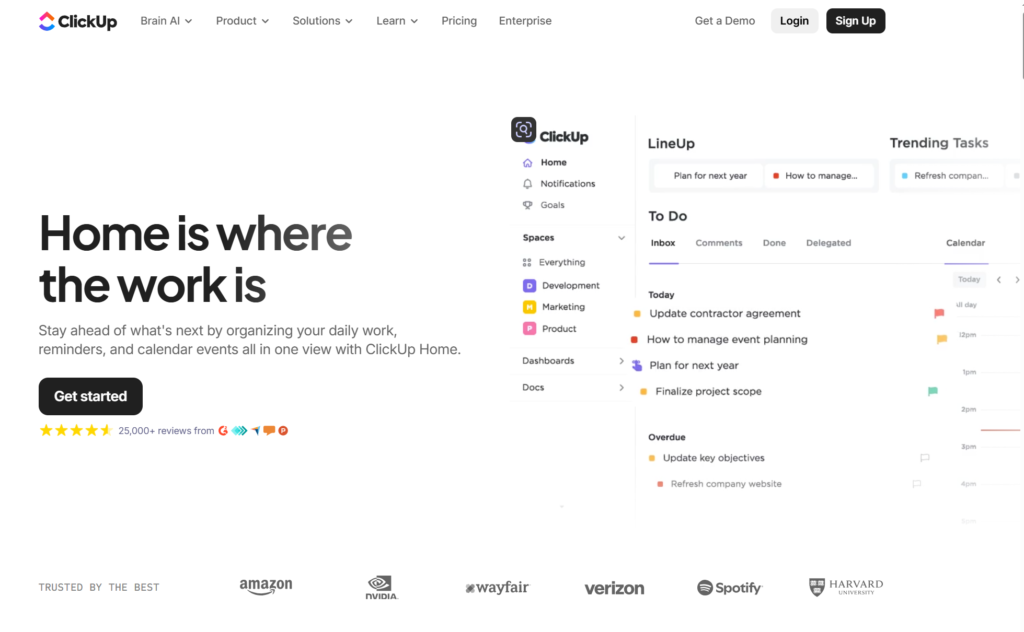
ClickUp is an all-in-one productivity and project management platform. It combines tasks, docs, goals, calendars, dashboards, forms, automations, whiteboards, time tracking, and team collaboration in one place.
In this ClickUp Review 2026, we will look at what ClickUp does, who it is best for, its best features, pricing, pros and cons, and whether it is worth using.
Quick Verdict: ClickUp is worth it for small businesses, agencies, creators, freelancers, and teams that want one central place to manage tasks, projects, docs, deadlines, and workflows.
CTA: Try ClickUp here
What Is ClickUp?
ClickUp is a project management and productivity tool.
In simple words, it helps you organize work.
You can use ClickUp to manage:
- Tasks
- Projects
- Team deadlines
- Content calendars
- Client work
- Documents
- Goals
- Dashboards
- Forms
- Automations
- Time tracking
- Team communication
Instead of using five separate apps, ClickUp tries to bring everything into one workspace.
For a small business, this can be valuable because it reduces confusion. Everyone can see what needs to be done, who owns it, and when it is due.
Who Is ClickUp Best For?
ClickUp is best for people who have many tasks, projects, clients, or team members to manage.
It is a strong fit for:
1. Small Business Owners
Small business owners can use ClickUp to manage daily operations, client projects, content, hiring, admin work, and team responsibilities.
2. Agencies
Marketing agencies, web design agencies, SEO agencies, and social media agencies can use ClickUp to manage clients, deliverables, approvals, calendars, and recurring tasks.
3. Freelancers and Consultants
Freelancers can use ClickUp to organize client work, deadlines, invoices, documents, and follow-up tasks.
4. Content Creators
Creators can use ClickUp for video ideas, blog posts, social media calendars, sponsorship tracking, and production workflows.
5. Remote Teams
Remote teams can use ClickUp to keep tasks, messages, documents, goals, and deadlines in one place.
Best ClickUp Features in 2026
1. Task Management
Task management is ClickUp’s core feature.
You can create tasks, assign them to people, add due dates, attach files, leave comments, set priorities, and track progress.
This is useful for small businesses because it gives every task an owner.
Instead of saying, “Who is handling this?” you can open ClickUp and see the answer.
2. Multiple Project Views
ClickUp lets you view work in different ways.
Common views include:
- List view
- Board view
- Calendar view
- Gantt view
- Timeline view
- Workload view
- Table view
This matters because different people think differently. A manager may want a timeline. A writer may want a list. A designer may want a board. A business owner may want a calendar.
3. ClickUp Docs
ClickUp Docs lets you write and organize documents inside ClickUp.
You can use Docs for SOPs, meeting notes, client notes, project briefs, content outlines, company policies, training guides, and checklists.
This is helpful because your tasks and documents can live in the same workspace.
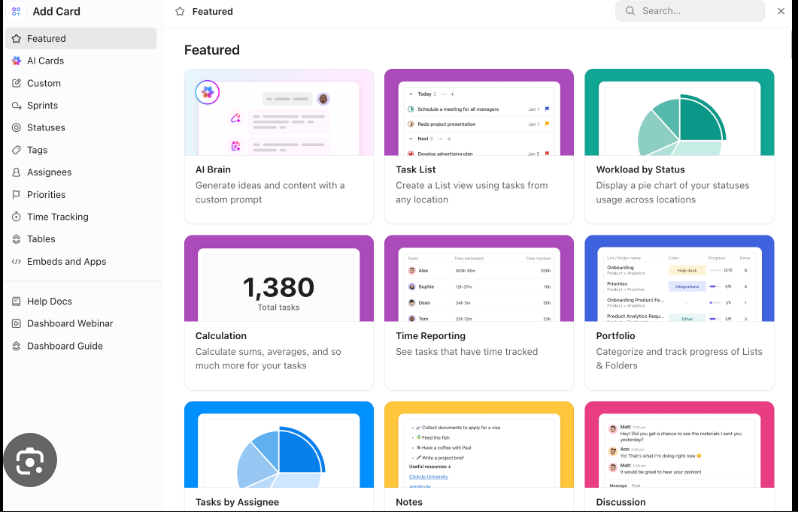
4. ClickUp Dashboards
Dashboards help you see business activity at a glance.
You can create dashboards for open tasks, overdue tasks, team workload, project progress, sales pipelines, content calendars, client projects, and time tracking.
For small business owners, this is useful because you do not want to dig through every task manually. You want a quick view of what is happening.
5. Automations
ClickUp automations can save time by handling repetitive actions.
For example, you can create automations like:
- When a task is marked complete, move it to the next stage
- When a new task is created, assign it to a team member
- When a due date arrives, send a reminder
- When a status changes, notify someone
- When a form is submitted, create a task
6. Forms
ClickUp Forms let people submit information that becomes a task.
This can be used for client requests, content requests, bug reports, project intake, employee requests, and customer feedback.
7. Time Tracking
ClickUp includes time tracking features. This is helpful for freelancers, agencies, and consultants who need to know how long work takes.
You can use time tracking to track billable hours, estimate project costs, measure team workload, improve pricing, and understand where time is going.
8. Templates
ClickUp offers templates for many workflows.
You can use templates for project management, content calendars, CRM pipelines, product launches, meeting notes, hiring workflows, sprint planning, and personal productivity.
ClickUp Pricing in 2026
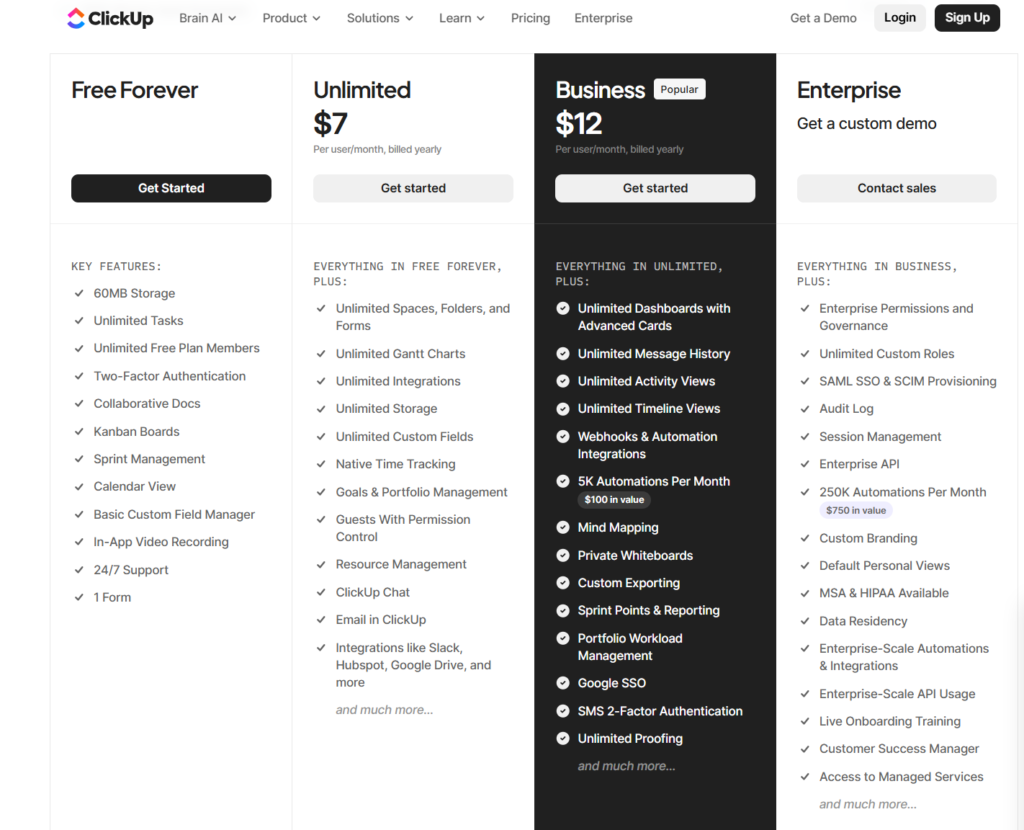
ClickUp has several plans:
- Free Forever
- Unlimited
- Business
- Enterprise
The Free Forever plan is good for testing ClickUp. It includes useful basics like unlimited tasks, collaborative docs, Kanban boards, calendar view, sprint management, one form, and 60MB storage.
The Unlimited plan is better for small teams that need more storage, integrations, dashboards, Gantt charts, custom fields, time tracking, and more.
The Business plan is better for growing teams that need advanced dashboards, automations, workload management, Google SSO, advanced reporting, and stronger team features.
The Enterprise plan is for larger organizations that need advanced permissions, governance, custom roles, SAML SSO, audit logs, HIPAA availability, onboarding, and dedicated support.
Simple advice: Start with the Free Forever plan. If ClickUp becomes the main place where you manage work, upgrade when the limits slow you down.
CTA: Try ClickUp here
Pros and Cons of ClickUp
Pros
- Very flexible: ClickUp can work for many types of businesses and workflows.
- Good free plan: Beginners can test it without paying upfront.
- All-in-one workspace: Tasks, docs, forms, dashboards, goals, and automations can live together.
- Strong for teams: It helps teams see ownership, deadlines, and progress.
- Good for agencies and freelancers: Client projects, content calendars, and recurring tasks are easy to manage.
- Templates save time: Templates help beginners avoid starting from zero.
Cons
- Can feel overwhelming at first: ClickUp has many features, so beginners may need time to learn it.
- Setup matters: If you set up ClickUp poorly, it can become messy.
- May be too much for simple users: If you only need a basic to-do list, ClickUp may be more than you need.
- Advanced features may require paid plans: Growing teams will likely need Unlimited, Business, or Enterprise.
ClickUp vs Notion vs Trello
| Feature | ClickUp | Notion | Trello |
|---|---|---|---|
| Task management | Strong | Basic to moderate | Simple |
| Docs | Strong | Very strong | Limited |
| Project views | Many views | Flexible databases | Board-focused |
| Automations | Strong | Limited/moderate | Basic/moderate |
| Time tracking | Built in | Not native | Usually requires add-ons |
| Best for | Teams and operations | Knowledge management | Simple visual task boards |
ClickUp vs Notion
Notion is excellent for notes, databases, wikis, and knowledge management.
ClickUp is stronger for task execution, deadlines, team ownership, dashboards, and project tracking.
Use Notion if your main need is organizing knowledge.
Use ClickUp if your main need is managing work.
Internal Link: Best AI Tools for Small Business 2026
ClickUp vs Trello
Trello is simple and visual. It is good for basic Kanban boards.
ClickUp is more powerful because it includes more views, docs, dashboards, automations, time tracking, forms, and deeper project management features.
Use Trello if you want something very simple.
Use ClickUp if you want a system that can grow with your business.
ClickUp vs Asana
Asana is a strong project management tool. It is often easier for teams that want a cleaner, simpler setup.
ClickUp is usually more flexible and feature-rich.
Use Asana if you want simplicity.
Use ClickUp if you want more customization, more features, and an all-in-one workspace.
Internal Link: Best AI Tools for Solopreneurs 2026
Best Ways to Use ClickUp for a Small Business
1. Content Calendar
Use ClickUp to plan blog posts, YouTube videos, newsletters, and social media content.
A simple content workflow could be idea, outline, drafting, editing, images, scheduled, and published.
2. Client Project Tracker
Agencies and freelancers can use ClickUp to manage client deliverables.
Track client name, project stage, deadline, owner, files, notes, and approval status.
3. SOP Library
Use ClickUp Docs to create standard operating procedures.
Examples include how to onboard a client, publish a blog post, send invoices, handle support tickets, or create social media posts.
4. Weekly Task Planner
Use ClickUp as a weekly operating system.
Each week, create tasks for sales, marketing, admin, client work, content, finance, and follow-ups.
5. Team Dashboard
Create a dashboard that shows tasks due this week, overdue tasks, tasks by owner, project progress, time tracked, and open client requests.
Is ClickUp Good for Affiliate Marketers?
Yes.
ClickUp can be useful for affiliate marketers because affiliate sites need consistent content production.
You can use ClickUp to manage keyword research, article outlines, drafts, publishing schedules, affiliate links, image tasks, SEO checks, Pinterest tasks, and email newsletter tasks.
For example, a ToolsUnpacked-style affiliate site could use ClickUp to track every article from keyword idea to published post.
Internal Link: Best AI Tools for Content Creators 2026
Is ClickUp Worth It in 2026?
Yes, ClickUp is worth it in 2026 if you need a serious system for managing work.
It is especially worth it if you want to organize tasks, manage projects, track deadlines, build content calendars, create SOPs, use dashboards, automate repetitive work, manage client projects, and keep documents and tasks together.
ClickUp may not be worth it if you only need a simple personal checklist. In that case, a basic notes app or to-do app may be enough.
But for small businesses, agencies, creators, and teams, ClickUp is one of the strongest all-in-one productivity tools available.
Final Verdict: ClickUp is a strong choice for small businesses that want one place to manage tasks, projects, docs, dashboards, and workflows.
CTA: Try ClickUp here
FAQ: ClickUp Review 2026
Is ClickUp free?
Yes. ClickUp has a Free Forever plan. It is useful for testing the platform and managing basic tasks.
Is ClickUp good for small businesses?
Yes. ClickUp is good for small businesses because it helps organize tasks, projects, documents, deadlines, forms, dashboards, and workflows.
Is ClickUp better than Trello?
ClickUp is better if you need advanced project management features. Trello is better if you only need a simple visual board.
Is ClickUp better than Notion?
ClickUp is better for task management and project execution. Notion is better for notes, wikis, and knowledge management.
Can ClickUp replace multiple apps?
For some teams, yes. ClickUp can replace parts of task management, docs, dashboards, forms, whiteboards, and time tracking tools.
Is ClickUp hard to learn?
ClickUp can feel overwhelming at first because it has many features. Beginners should start with simple task lists before adding dashboards, automations, and advanced views.
Who should use ClickUp?
ClickUp is best for small business owners, agencies, freelancers, consultants, content creators, and teams that need to manage many tasks and projects.
Prepping for finance or technical interviews?
ToolsUnpacked products are built to help you answer cleaner, avoid preventable mistakes, and show up prepared.